Author Archives: thesocialworkpad

Appy Halloween – 24 Educational Apps for Howliday Fun!

appydazeblog's avatarappydazeblog

Only 3 days until Halloween!

Here are 24 educational Halloween apps with links so that you can download them. They were all FREE when I downloaded them – which is why you should follow my blog. 🙂

Several of them are FREE again. Enjoy and Happy Halloween!!

grandmaFREE for a limited time – Grandmas Loves Bugs, another adorable educational app for preschoolers by Fairlady Media. Kids join dancing grandma in her garden to learn all about bugs. The app features 10 educational games – all thematically linked. Kids will love helping grandma in her garden and they will be learning math & reading as they do. The app also features short videos of real bugs in action. Some of the educational content in the games include: colors, observation (spot the difference), numbers (recognition & counting), letters (upper & lower case), memory, problem solving, and vocabulary. This app is nicely done…

View original post 2,457 more words

GRAPHITE – A GREAT WAY TO FIND APPS AND APP REVIEWS

Great for social workers, counselors, and other helping professionals

Great for social workers, counselors, and other helping professionals

Looking for that specific app but you just don’t have the time to search, read the specifics and test out the app.  The app sounds good, but it may be a fee, and to top it off, there are in app purchases.  This can be so frustrating, but there is an answer, Graphite.  Below is what Common Sense Education has to tell us about Graphite.

Graphite is a free service from Common Sense Education that makes it easy to discover the best apps, games, and websites for classroom use. Tools like Edmodo, Educreations, ClassDojo, and Socrative have been thoroughly reviewed by our expert educators and received numerous teacher reviews we call Field Notes. We’ve also reviewed lots of Common Core-aligned products like StudySync, PBS Learning Media, VoiceThread, IXL Math, and Khan Academy.

Wondering how to use BrainPOP Jr. effectively with your students? We’ve got you covered. Ever considered using Minecraftwith students? Read Chad Sansing’s blog article comparing Minecraft and MinecraftEdu. Our educational expert reviewers rated ABCya! three stars for learning potential, while our teacher community has collectively given it four. How would you rate it? It’s easy to add your voice to the conversation about how to best leverage technology in the classroom. Simply join for free and start submitting Field Notes about the products you use with students.

Whether you’re looking for tips for using Twitter in the classroom or advice on which media creation tools are best for flipping your classroom, Graphite’s ratings and reviews, blog articles, and webinars provide the information you need to make great technology choices.

Although the site discusses apps reviewed for teachers, the reviews help counseling professionals make decisions regarding  apps that can assist with various social emotional learning goals.  Clinicians, make your voice heard and add a review!

Printable Worksheets & Teaching Aids – Print ready Documents in PDF format

 Wonderful resources on this site!  I’m sure one of the PDF’s can be used to assist students with interacting with others and learning academic skills at the same time.  One of my favorites is the Doltch Word Story.  It’s a tale with a great moral ending.  This story can be used to assess reasoning, critical thinking, and reading skills.  What a great way to support a students learning while collecting data, both academic and social/emotional.  dolch_story

Printable Worksheets & Teaching Aids – Print ready Documents in PDF format, September 2008 – Teachers.Net Gazette.

BACK TO SCHOOL TOOLS

imagesCA79SU1UUsually I try to make one post a month, but August and September are back to school months for many. Often school clinicians like to make a goal of reinventing themselves for the new school term. So for the month of September I will write a few more posts than usual. Maybe some of my tech finds will be of interest to you or maybe you know someone you can pass the information along to. If you have found this blog by mistake and like what you have read, please subscribe to get my post monthly and bookmark my site. All comments are appreciated, and look out! Here comes my back to school tools edition.

INSTAGRAM: THE NEW GLASS SHOWCASE

Why Instagram is good for promoting your ideas

Why Instagram is good for promoting your ideas or business

As a professional, parent, teacher or counselor, have you ever looked at Instagram and wondered, ” what is this app used for other than silly photos?”  Well Instagram can be used as an online showcase for your clients, students, and individual work.  Many people are using Instagram to show off their talents and skills.  A tattoo artist, beautician, seamstress, cake maker, speaker, etc., can place photos of their talents on Instagram as a way of promoting their crafts.  

As a clinician, Instagram can be used to promote a cause, display service learning ideas, showcase students’ work, or tell a stories of inspiration.  The old saying, “A picture is worth a thousand words.” means much more when using Instagram as a promotion tool.  When others like, retweet, or share your Instagram photos you can gain a lot within your business or profession, while also promoting your ideas .  The sky is the limit when using Instagram.  So make Instagram your new tech project and share your creativity in the virtual showcase.  

What are some of the ways you plan to use Instagram?  Please share your ideas.

WANNA BE A TECHIE? START WITH THESE EASY, FREE AND WEB BASED IDEAS

Ever wondered how many of the professionals that are gaining notoriety by writing blogs, posting to Facebook, tweeting , and developing Pinterest boards, are getting their ideas.  Well if you want to be a techie, you have to keep up with what’s happening in the cyber world.  This summer, transform yourself, and begin your change by learning how to incorporate technology into  your practice.  I write this blog with clinicians in mind, so I examine the various ways similar tools used in education, can be adapted for the social services.  I  keep in mind that my goal is to reach a variety of readers and I hope that my information can be tweaked, and used to suit each readers needs.   

So how can you begin?  I have a lot of sites, blogs, and social networks I visit frequently to keep me current with what’s trending.  In this post, I’ll share with you some of the best sites that keep me up to date and allow me to be a technosocialworker! 

DEVELOP A PLN: TRY AND LEARN ABOUT ONE OF THESE IDEAS

BrWaa1VCIAAsIpp

Personal Learning Networks Chart From @simplysuzy

TRY A FREE ONLINE COURSE ABOUT TECHNOLOGY

http://www.edudemic.com/moocs-teachers-boost-pd-summer/?utm_medium=twitter&utm_source=twitterfeed

teachercast2

Videos, podcasts, guides and more to help you learn how to use technology!

FOLLOW SITES THAT PROMOTE AND ASSIST YOU IN YOUR PROFESSION

Try reading some of the blogs from the profession.  This list hasn’t been updated recently but there are some good blogs on here.  Of course my blog; thesocialworkpad.wordpress.com is GREAT!

 MOBILE SOCIAL WORK – ANOTHER GREAT TECH SITE


FOLLOW OTHER COLLEAGUES ON TWITTER – Below are examples @socialworkpad @thesocialworky  @Marquita_B  @ceunits  @HuffPostParents   @SpyParent   @CarolSebian  @dorleeM  @CommonSense   @Julie_Hanks  @TheRoot  @SchoolSocialWork   @law_socialwork  @socworkpodcast  @Podsocs  @kathyschrock  @rmbyrne  @larryferlazzo

Don’t forget to make a Pinterest site and follow other social worker, techies, teachers, counselors etc.  This site is very addictive!  One board leads to another, and another, and another.  My Pinterest name is socialworkpad.   Start exploring these sites and you’ll learn a lot about technology.  In no time you’ll be on your way to becoming a techie!


WHATS TRENDING IN SOCIAL WORK? CHECK OUT THIS BLOG. @DorleeM

Social Work Career Development

Social Work Career Development

This site provides a variety of social work career resources such as: roundups of webinars and best in mental health posts from around the web, self-care, interviews with mental health professionals on different modalities/practices, key learning’s from trainings, as well as LMSW licensing exam strategies, interviewing tips and more.  The site creator researches pertinent information that can be helpful in practice.   Great tool on the internet to bookmark and add to your Pinterest.  Check out the site by clicking on the image above.


Incorporate Brain Breaks, Exercise, and Calming Techniques In Your Day With GoNoodle

This web-based site is a true gem and something everyone can use at some time or another.  One of the teachers, that I commonly share my web finds with, had a surprise for me. Teacher,  Ms. Harrison, stated that her class had something fun to show me, and the class couldn’t wait to show me.  It was this wonderful site “GoNoddle.”  Hook your computer up to an interactive whiteboard, projector, TV, or play right on your laptop. As long as you can see the screen you can enjoy the fun.  GoNoddle has a variety of activities that are mostly interactive simulation games that get you up exercising, or calming you down.  

One cool part about GoNoddle is that it adds a challenge with the activities.  It only takes two minutes to sign up to GoNoddle and it’s absolutely free!  When you first sign up you have to choose a mascot (a funny looking monster) for your group.  For every 15 minutes of game play on GoNoddle, you gain energy points that increases a growth bar.  The bar rises after you have completed 15 minutes of an activity, and your monster grows bigger.  The group loves seeing the mascot grow and grow after each 15 minutes of game play, and this motivates the students to get up and get involved.  The interactive activities are incorporated with some of today’s coolest characters and songs.  Move your body to Pharrell’s Happy song or dance to the Cha Cha Slide.  If you want to do a calming classroom exercise, play Airtime where the students practice deep breathing.  Go Noddle seems to be geared towards primary age students but I’m certain that with the right introduction, teens and even adults can enjoy activities on GoNoddle.  It’s just so much fun.  Try it out over and over again!  

http://www.youtube.com/watch?v=edzZubQwG30

The Not So Innocent Apps. @Sedgrid Lewis shares the dangers of four popular apps

This is an excellent article that was written by Sedgrid Lewis, cyber crime expert. This article was featured on the Good Men Project site.  I thought that it was important for clinicians, parents, teachers and others who have children, to be aware of these apps.  I personally have seen the dangers of each of these apps, and became familiar with them when my students used them inappropriately and ended up in the discipline office.   This blog post is a reprint from the article written by Sedgrid Lewis.  Follow Sedgrid on twitter @spyparent .

Cyber Crime Expert Sedgrid Lewis shares the four hottest apps being used by teens and why parents need to monitor them. – See more at: http://goodmenproject.com/featured-content/4-apps-teen-love-that-parents-need-to-monitor-kerj/#sthash.dWwMXMeq.LZYa30Yq.dpuf

The list below is the hottest apps that are being used by teenagers. We take a look at why teens love them and why you should monitor them.

snapchat

1. Snap Chat – Why Your Teen Loves It. 

 Snapchat allows users to send images and videos to their friend lists.   The secret sauce is that the sender can place a time limit on how long the receiver reviews the image or video.  The content or “Snaps” self-destruct from 1-10 seconds based upon the time limit set by the users.  After the snap self-destructs it is also deleted from the Snapchat Servers. Teens love snapchat because of it’s simplicity and speed.  It sends photos and videos much faster than standard text messages.  Teens sends millions of snaps throughout the day of funny facial expressions or pictures of their pets.

Why You Should Monitor It

Snapchat is the number one sexting app on the market.  Teens send nude snaps to their significant others under the impression that snaps self-destruct.  Forensic Experts have stated the snaps can easily be recovered thus they are never truly deleted from the receiver’s phone. Due to the countless number of nude snaps, porn sites have popped up over the internet to take advantage of the free content. There have also been numerous cases of bullying with the app.

Kik-logo

2. Kik Messenger

Why Your Teen Loves It  

Super quick instant messaging app with over 100 million users that allow teens to exchange videos, pics, and sketches.  New Kik cards allow user send Youtube videos, create memes, and gifs without leaving the app.  Kik Cards reached over 2 million users within first week of their launch.

Why You Should Monitor It

Teens are using the Kik app for sexting and dating. Teens are sending nude selfies to one another through the app. The term sex buddy is being replaced with Kik Buddy. Teens used Reddit and other forum sites to place classified ads for sex by giving out their Kik usernames. Kik does not offer any parental controls. Additionally, there is no way of authenticating users thus making it easy for pedophiles to use the messenger app.

whisper app

3. The Whisper App

Why Your Teen Loves It Whisper is the Teen Confession App. It allows users to superimpose text over a picture. The secret sauce is that users are anonymous thus allowing for secrets to be posted. Over 70% of whisper users are women under the age of 25. Whisper provides freedom for young users to share raw feelings and emotions over simple pictures.

Why You Should Monitor It

Teens have started using the app for cyberbullying. Due to the anonymous feature of the app, teens are posting pics of other teens with derogatory text superimposed on the image. Users do not have to register to use Whisper thus no user profile. Unfortunately, the app allow users to communicate with other users nearby by using the device GPS location settings. Pedophiles seek out female whisper users to establish a relationship. Recently, a Seattle, Washington man was arrested for raping a 12 year old girl that was lured to a hotel through the app.

askfm

4. Ask.fm App

Why Your Teen Loves It

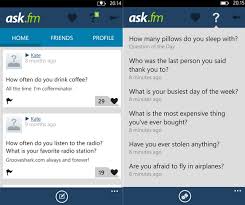
Ask.fm is one of the hottest social networking sites that is almost exclusively used by teenagers and pre-teens. 25% of teens have posted something on ask.fm over the past 30 days. It is a question and answers site that allows user to ask anonymous questions. Ask.Fm has Twitter and Facebook integration that allows users to connect with all their friends on those popular sites.

Why You Should Monitor It

Due to intense bullying, Ask.fm has led to 4 documented cases of suicide in the United States, Ireland, and Great Britain. User engage in hyper bullying by constantly asking inappropriate and derogatory questions. The app is totally anonymous and is not being monitored by the developers. The key for parents is to monitor downloaded apps on their child’s phone. Google the apps to learn if they are dangerous or inappropriate. Gather all of your child’s passwords and user names for monitoring purposes. If your teen refuses to give you his or her passwords, then download spyware such as Mspy to review your teen’s cell phone activity. It is always better to be safe than sorry.

This article was written by Sedgrid Lewis.   You can also read more on his site http://www.spyparent.net/


A Cool Tool That Helps Teach Calming Techniques

Calm.com is an online tool that also has an app (iPhone only right now) to use on your cell phone or tablet.  Calm.com is a relaxation and therapy website that has calming music and pictures to use when practicing managing your emotions or distressing after a rough time.  This tool can be used successfully on a Smart Board in the morning when the students are beginning their day.  This tool can also be used to teach  meditation techniques.  The music and pictures used together are really relaxing.  How would you use this tool?  Check it out at calm.com